Skip to work
MINGYUE QU
Selected works

Hey, my name is Mingyue.I’m a Senior Product Designer.

I enjoy building something from the beginning, working through the open questions until an idea becomes a product people can use.

I care about getting both the logic and the details right: how each step connects, how information is arranged, and how everything lines up on screen.

Contents

  1. 01Overview
  2. 02Product Setup
  3. 03AI-Assisted Listing
  4. 04Smart Bundling
  5. 05Outcomes & Reflection

© 2026 Mingyue Qu

Brewwww! app cover

Brewwww!

Consumer, gamification, App

Seller Hub home, inventory and orders mobile screens

Seller Hub

Seller Operations Platform, B2B, Mobile

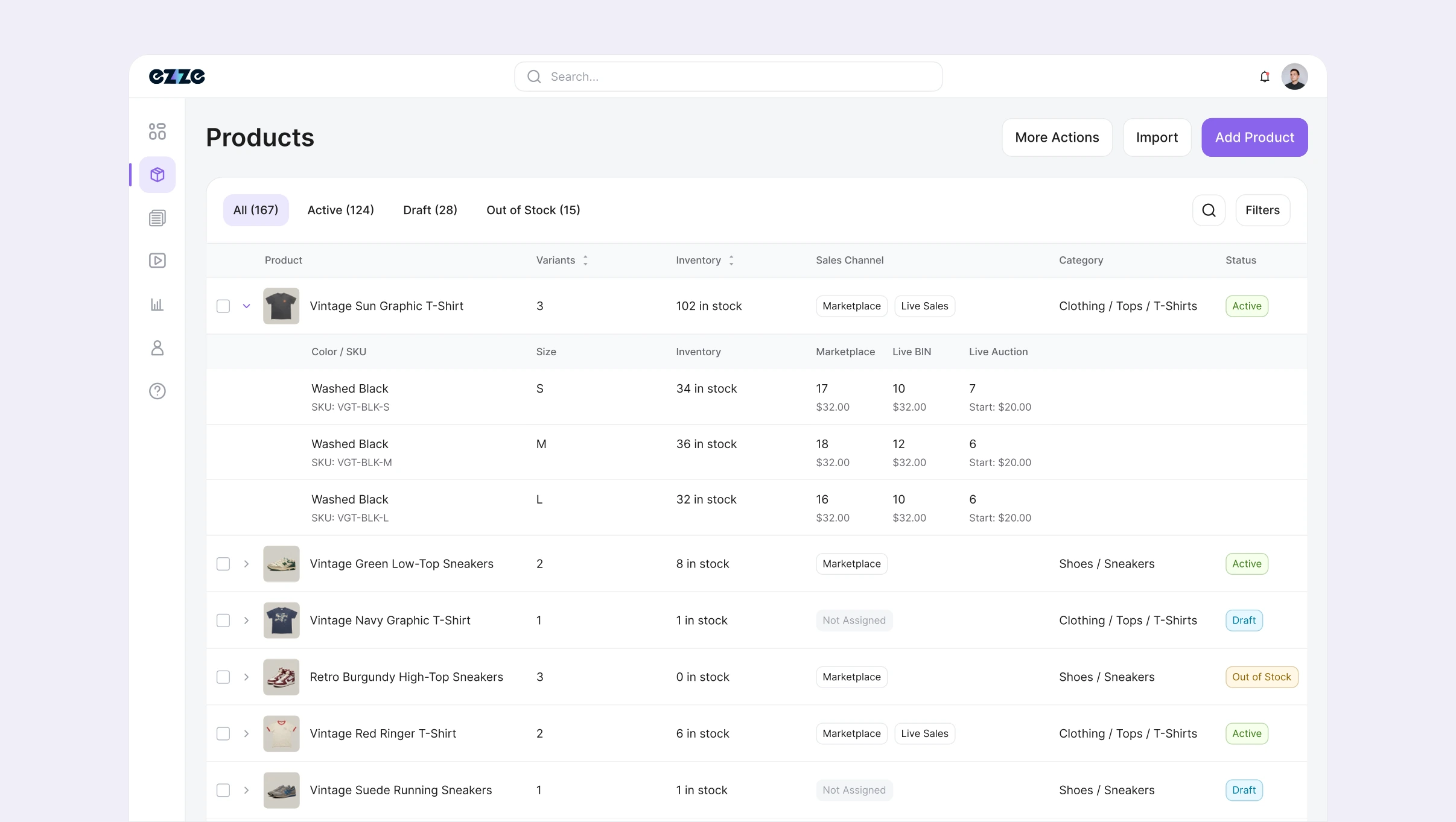
Seller Dashboard Products list with expanded variants, shared inventory, and sales channels

Seller Dashboard

Seller Operations Platform, B2B, Web

Admin Dashboard overview and seller list on a blue-grey background

Admin Dashboard

Internal Operations Platform, Web

myqudesign@gmail.com

About

Mingyue Qu

Thoughtful systems.
Clearer experiences.

I’m a product designer based in Los Angeles. My work spans commerce platforms and consumer apps, with a focus on turning complex workflows into experiences that feel natural.

I work from the bigger picture down to the details: how information is organized, how a flow unfolds, and how each interaction helps someone move forward.

Selected Experience

Ezze LiveSenior Product Designer
Brewwww!Founding Designer
Get in touch ↗

View case study ↗

Seller Dashboard

Role
Lead Product Designer2023-2025
Scope
Product SetupAI-Assisted ListingSmart Bundling
Industry
Live Commerce
Team
Product ManagersEngineeringSellers
Seller Dashboard Products list with expanded variants, shared inventory, and sales channels
Product information and inventory shared across Live Sales and Marketplace.

/01. Overview

Less repeated work. More control over what ships.

Seller Dashboard is Ezze’s web workspace for sellers to prepare products and fulfill orders. As the business expanded from Live Sales to Marketplace, sellers needed to manage both channels without repeating setup or losing control of individual items and parcels.

In 2023, listing was manual and orders shipped separately. Marketplace, on-demand AI, and automatic order grouping followed in 2024. The 2025 redesign addressed what those additions exposed: long forms, repeated inputs, and bundles that did not always fit one package.

I led workflow and interaction design across the three releases. Interviews and feedback meetings with three experienced sellers highlighted repeated listing and shipping work. I combined that input with workflow reviews and feedback from live use to decide what to automate and what sellers needed to control.

/02. Simplifying Product Setup

One product. Shared inventory. Channel-specific prices.

Reviewing the 2023 and 2024 forms showed that AI assistance addressed writing effort while the editing surface remained long. I separated shared product information from channel decisions: photos, details, variants, and stock stay together, with channel settings and shipping alongside them.

Live Sales reserves inventory for Buy It Now or Auction; Marketplace uses the remainder. Sellers can price only the variants they want in each channel. Unpriced variants stay out of that channel, without removing them from the product.

I accepted an extra opening step for pricing dialogs because channel configuration did not need to dominate every product edit. Sellers can prepare the product first, then choose variants and prices for each channel.

Set channel prices, then create the product.

/03. AI-Assisted Listing

A photo starts the draft. Sellers make it accurate.

In 2024, sellers requested AI for each listing. Photos were already required and supplied the draft’s input. In 2025, I connected generation to photo upload, removing the repeated request without adding another preparation task.

Vintage sellers still needed to verify item-specific details. I kept the generated draft editable, with the review prompt beside the photo and seller review before creation. Recently used categories handle recurring selections separately, keeping AI assistance focused on the individual item.
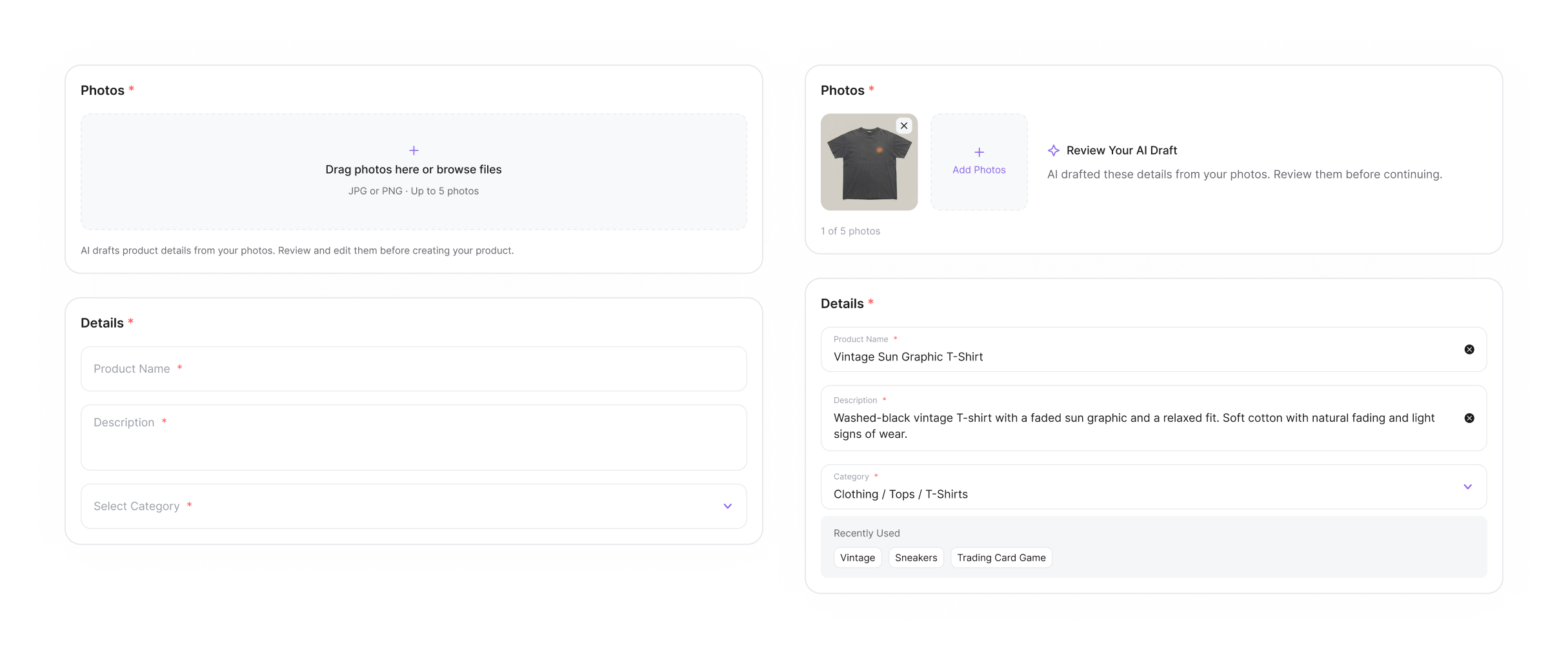
AI-Assisted Listing: empty product details beside an uploaded photo and editable AI draft
Photo-triggered drafting keeps the seller’s review beside the source image.

/04. Seller-Controlled Bundling

Find matching orders. Let sellers choose the parcel.

After automatic grouping launched in 2024, feedback from live use showed that same-buyer orders could need separate packages, especially for bulky items such as sneakers. A buyer match established relevance, but not package fit. I proposed keeping automated discovery and adding seller confirmation.

In 2025, selecting a confirmed order surfaces other eligible orders for the same customer and address. Sellers choose which to include. This adds a confirmation step, but lets the person handling the items decide what belongs in each parcel.
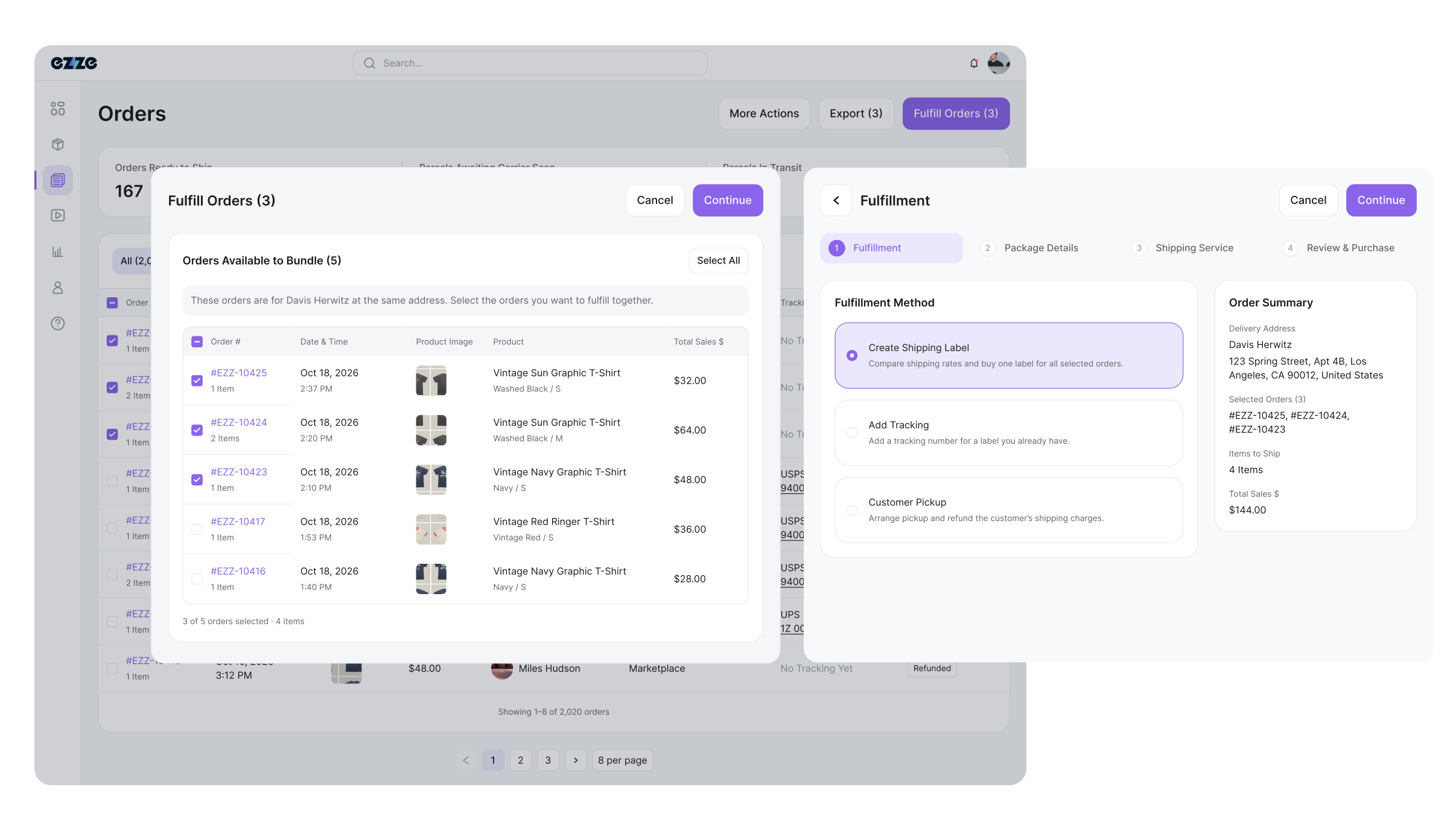
Seller-controlled bundling: related orders and seller-confirmed selection

Keep label creation in the same workflow

I kept package details, shipping options, and purchase review in one stepped dialog, with selected orders and costs fixed in the summary. Trading-card sellers also needed individual purchases to remain clear within a group. Orders therefore keep their own records while sharing shipment tracking after purchase.

/05. Outcomes & Reflection

Faster listing. Fewer fulfillment errors.

Launched in early 2025, the redesigned workflow grew to support 3,000+ registered sellers, increased adoption across Live Sales and Marketplace, and expanded daily active listings. AI-assisted drafts and remembered choices made product listing 3× faster. Seller-confirmed bundling and independent order management reduced fulfillment errors and related seller support complaints by 40%.

My central lesson was to define where automation should stop. Drafting and order discovery removed repeated work; editable details and bundle confirmation preserved seller judgment. Speed came from preparing the next decision, while keeping sellers in control of the result.
Admin Dashboard

Role
Product Designer2021-2022
Scope
Information ArchitectureData VisualizationDesign Systems
Industry
Live Commerce
Team
Product ManagementEngineeringOperations
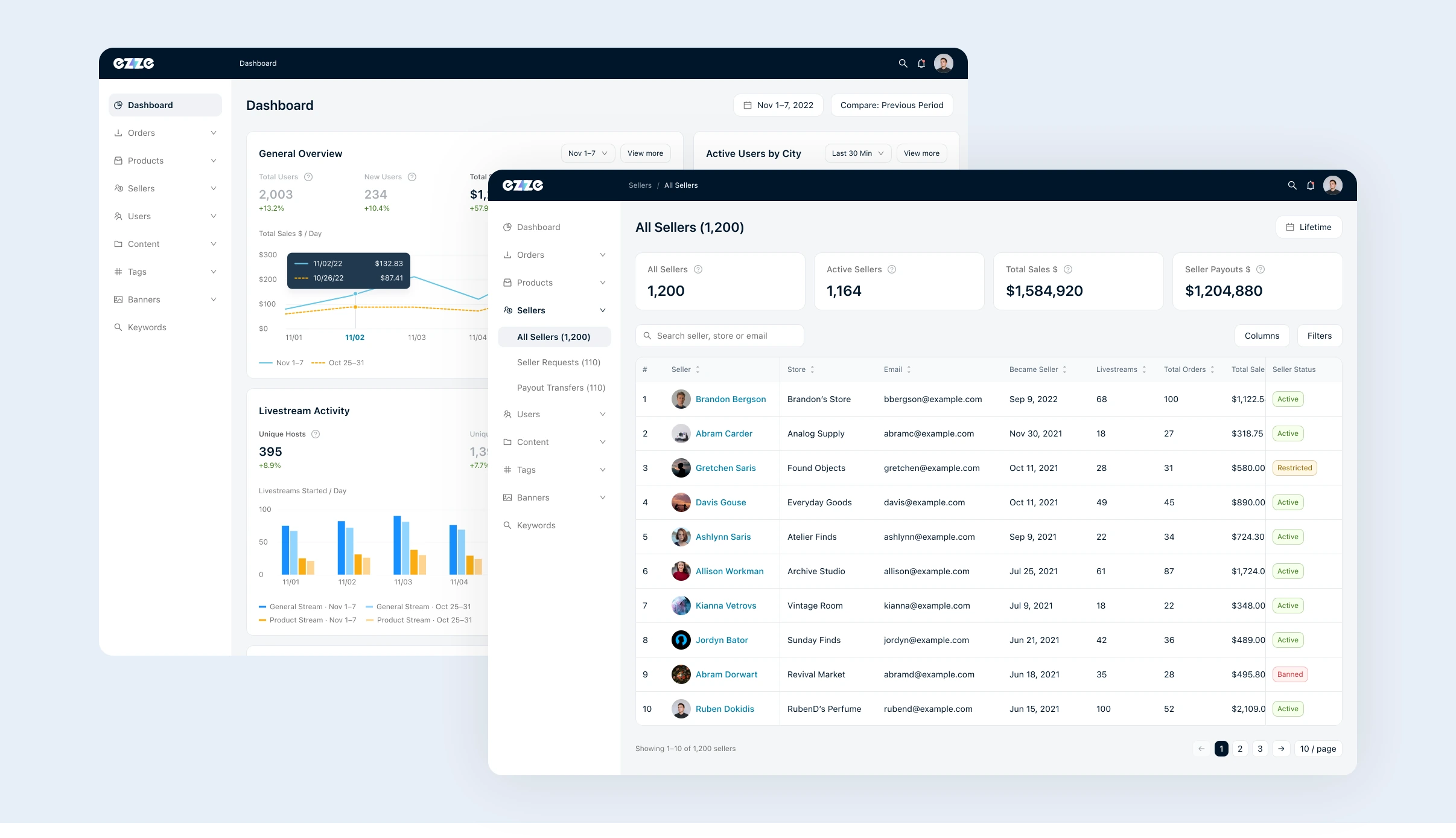
Admin Dashboard overview and All Sellers workspace

/01. Overview

Connect seller operations to business performance.

Admin Dashboard is Ezze’s internal workspace for managing sellers, products, orders, content, and payouts. In 2021–2022, I redesigned seller pages, analytics views, and shared UI components with product management, engineering, and operations.

The earlier dashboard centered on community activity. As commerce operations expanded, seller information remained scattered across overlays and long pages that mixed account details, transactions, and payouts. Finding a record and understanding its business context had become separate tasks.

I reviewed existing screens and operations requests, grouped related information, and designed the revised layouts. I then connected dashboard summaries to detail views and documented recurring table, card, and field patterns.

/02. Seller Workspace

Give each task a home. Keep the seller in view.

I reorganized seller details into six task tabs, separating profile context, products, orders, content, and payouts. Identity, account status, and Stripe connection stay in the shared header; Activity provides a consistent entry for history and notes.

The tradeoff was an extra navigation step for a more focused working area. Overview brings performance and profile context together. Record-heavy tabs give their tables room, and purchased orders sit within Orders instead of a separate destination.

For wider tables, I fixed record identity and status while supporting fields scroll horizontally. This preserves the relationship between a row and its details. I applied the pattern selectively, rather than forcing every list into the same layout.

Click the tabs to explore the seller workspace.

/03. Performance Analysis

Follow a business signal through to its detail.

Operations needed to move from a high-level number to the records behind it. I designed summary cards for scanning and detail pages for closer inspection. View more connects the two while preserving the selected metric and reporting period.

For Total Sales, I paired a period summary with a comparison chart and Daily Breakdown. Exact values appear on hover or tap, keeping the chart readable without labeling every point. Ranked tables identify the sellers, products, and livestreams behind business performance.

A shared date range establishes the starting window; local ranges let operations investigate one card independently. That flexibility can produce different reporting periods on the same dashboard. I kept each range visible beside View more and carried it into the detail view, making the scope of each comparison explicit.

Open a section to explore its details. Hover over or tap charts to inspect the data.

/04. Design System

Make shared patterns carry across the workspace.

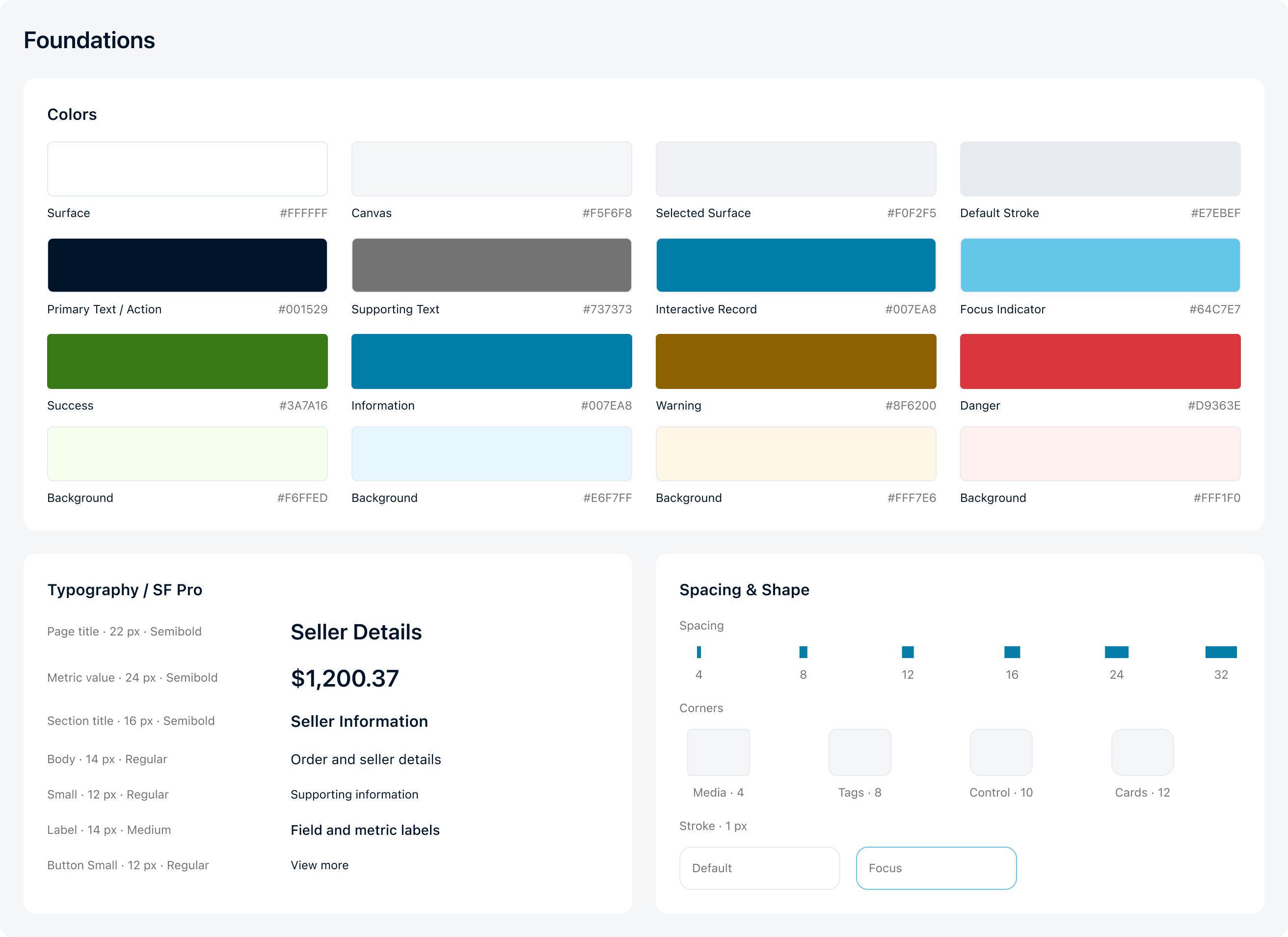
I collected recurring buttons, fields, filters, status tags, cards, and table cells from the redesigned pages and organized them into a shared component library. Typography, semantic colors, spacing, corners, and strokes give those components a common visual base.

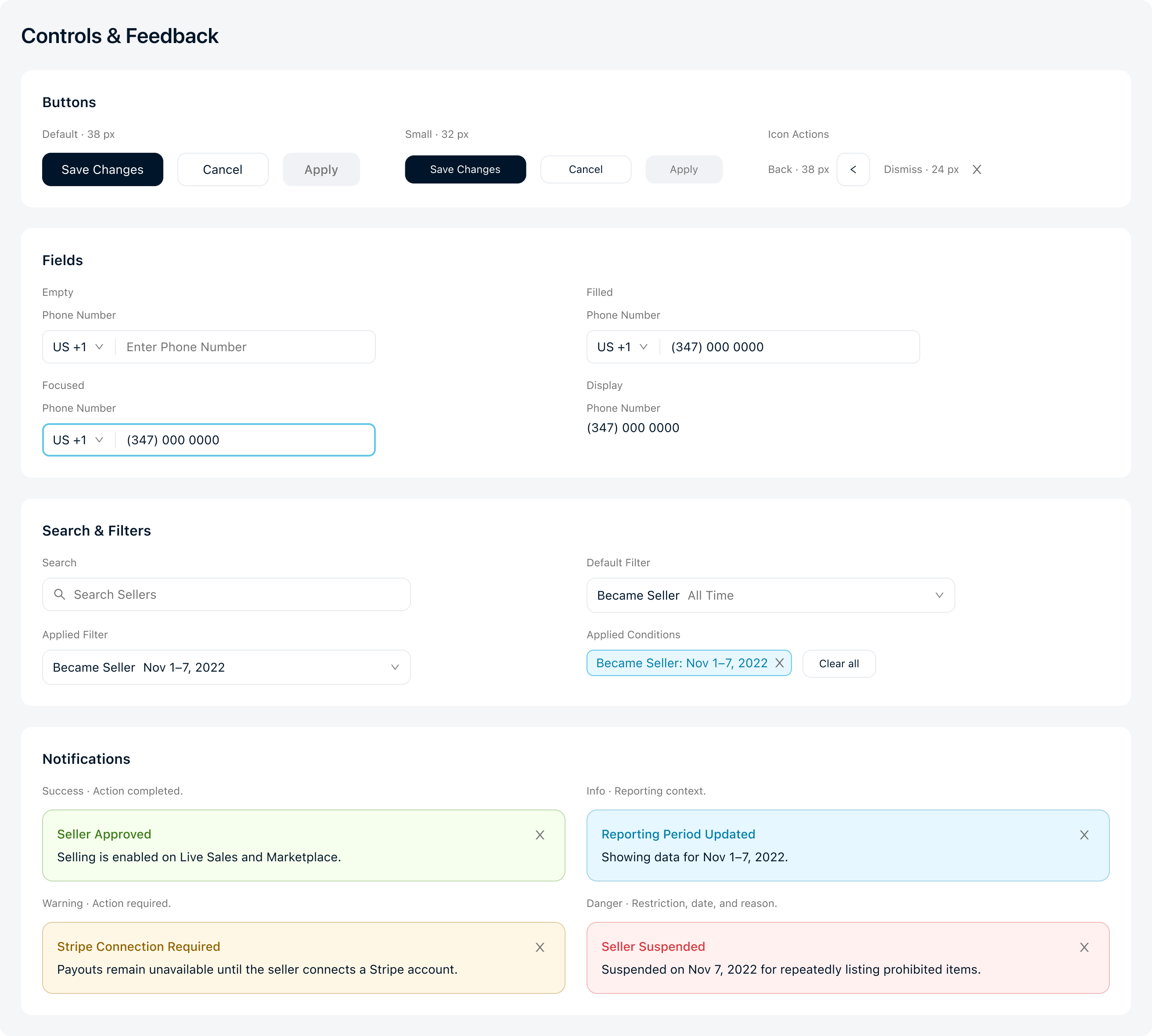
I documented empty, filled, and focused fields; default and applied filters; selected navigation; and feedback for success, information, warnings, and restrictions. These states show how each component responds during an operation.

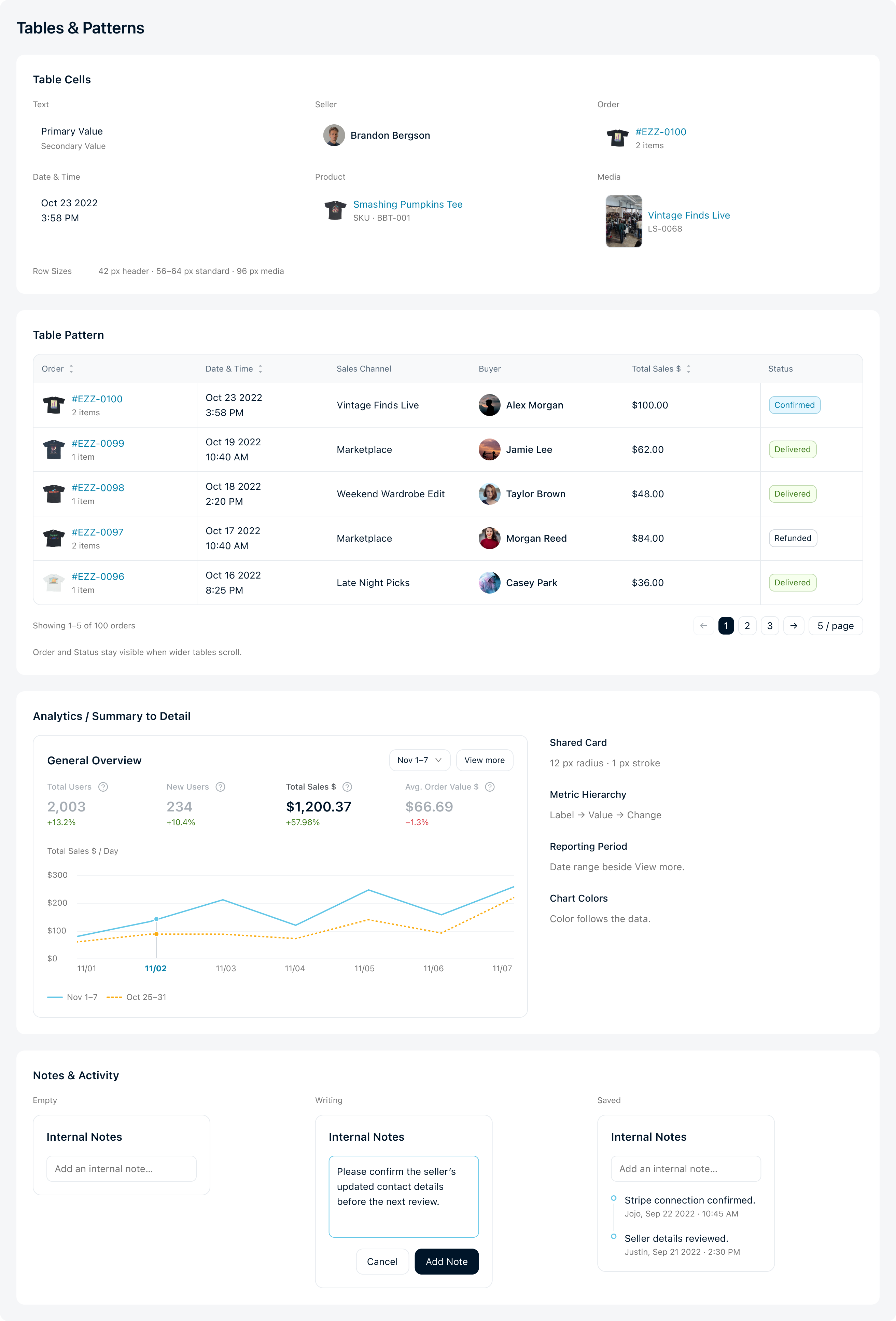
I also documented how the parts combine in complete examples: an Orders table, an analytics card, and empty, writing, and saved notes. These examples connect the library to the same screens shown earlier.

ADB Design System foundations: paired semantic colors, SF Pro typography, spacing, corners and strokes
ADB controls and feedback: buttons, field states, search, filters and four notification tones
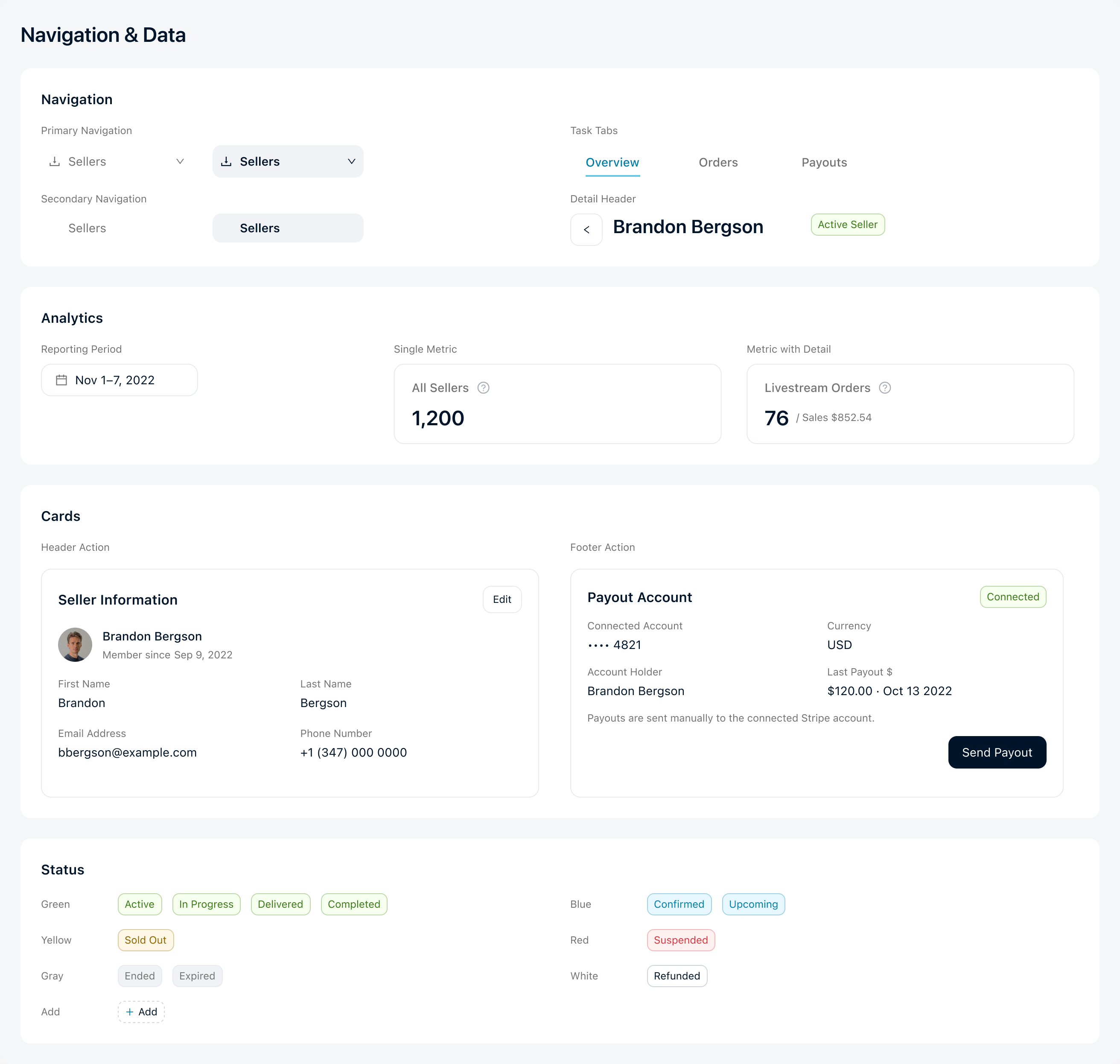
ADB navigation and data: navigation hierarchy, reporting controls, metric banners, information cards and status tags
ADB Design System table cells, five-row Orders table, analytics card and Empty, Writing and Saved notes

/05. Outcomes & Reflection

Make structure, data, and interaction work together.

The delivered pages give seller information a clear location, connect dashboard summaries to supporting records, and use consistent controls. The component library documents the states and patterns used across those pages.

Stakeholders responded positively. Following the redesign, internal records showed:

25%Reduction in task completion time

+15%Month-over-month sales growth

+10%Increase in average order value

Sales and average order value increased during the same period; these figures reflect broader platform performance.

The project taught me to settle information groups before polishing individual screens. Checking headers, tab names, metric labels, and states across related pages was essential to keeping the work coherent.

Seller Hub

Role
Senior Product Designer2026
Scope
Mobile Product DefinitionProduct SetupOrders & Fulfillment
Industry
Live Commerce
Team
Product ManagementEngineeringLeadership
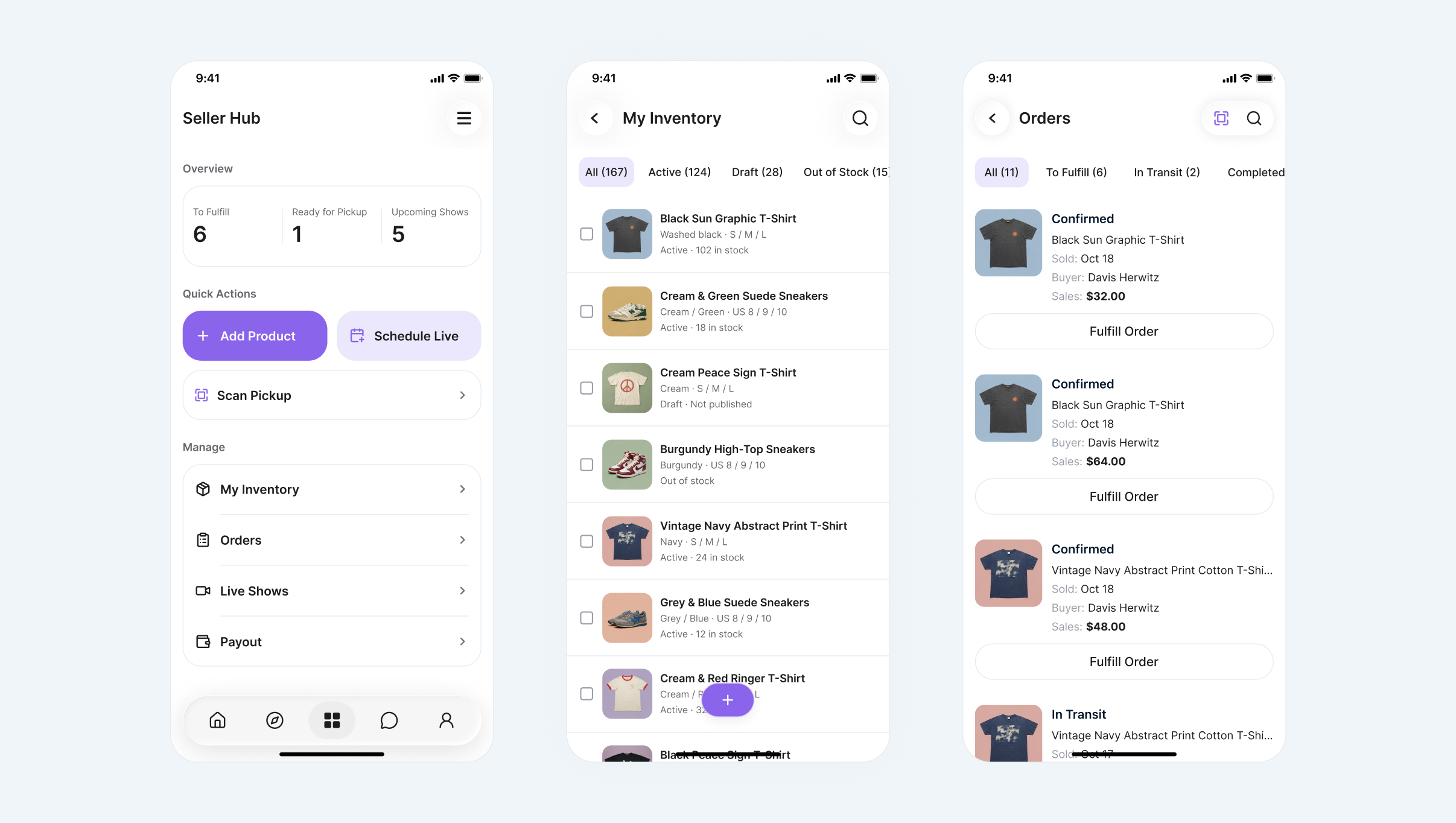
Seller Hub home, inventory and orders mobile screens

/01. Overview

Seller operations, beyond the desktop.

Seller Hub brings Ezze’s seller operations to mobile across Live Sales and Marketplace. In 2026, I owned its 0–1 product design, building on Seller Dashboard’s 2023–2025 web foundation. The product is now live.

Seller work extends beyond a desk, from preparing stock to handing purchases to buyers. The mobile product needed to support complete tasks while preserving the inventory, payment, and order rules established on the web.

I defined the mobile task hierarchy, focused editing model, and fulfillment checkpoints with product and engineering. The work connected product preparation, order decisions, and verified pickup in one seller workspace.

/02. From Web to Mobile

Keep the rules. Rethink the task.

I organized the experience around preparing a product, configuring its channels, finding an actionable order, and completing fulfillment. Each task needed a clear entry, its required information, and a visible saved or completed result. The criterion was whether sellers could finish and verify the task, rather than how many desktop controls could fit on the screen.

On mobile, product summaries lead to focused sheets for variants, prices, and shipping. Order cards prioritize recognition and action; identifiers and financial breakdowns sit in Order Details. I accepted extra openings for individual edits in exchange for a clearer main surface and a predictable return point. Simplification changed the information hierarchy while keeping business rules intact.

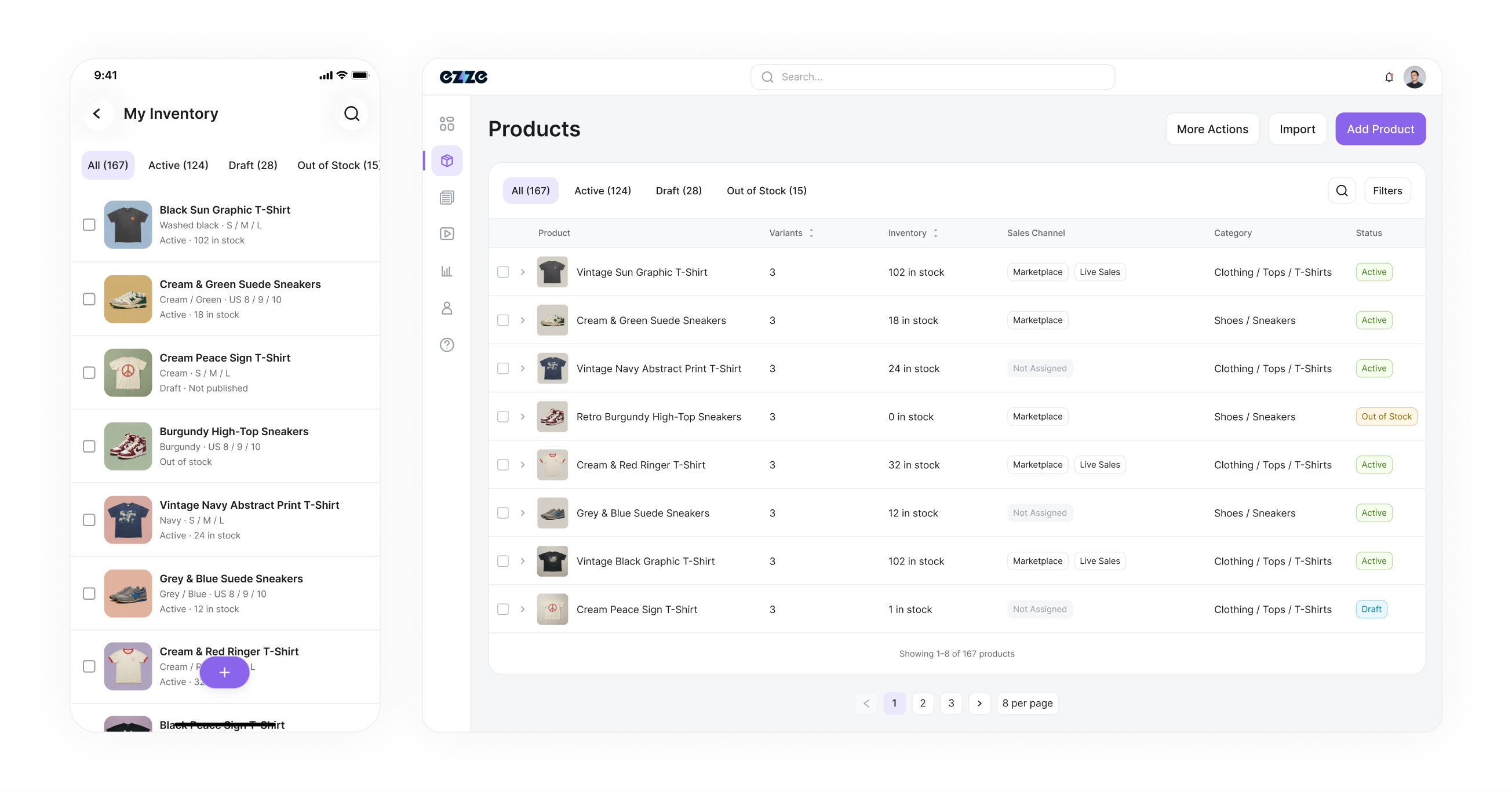
Seller Hub mobile inventory alongside Seller Dashboard web inventory

/03. Product Setup

Focused edits. A reviewable product.

A photo starts an AI-assisted draft for seller review. I carried that capability from SDB into a mobile capture-and-review task, keeping generated details editable before product creation. Save Draft preserves unfinished preparation.

Variant stock remains the source of inventory. Live Sales reserves quantities for Buy It Now and Auction; Marketplace uses the remainder. Sellers configure only the variants intended for each channel. Unused rows stay out of saved summaries. This separates creating a product from deciding where each variant sells, without suggesting the same stock is available everywhere. Live Sales validates quantity-and-price pairs; Marketplace shows remaining inventory as read-only and validates prices only for variants the seller chooses to list.

/04. Orders & Fulfillment

Clear next steps. A verified handoff.

I grouped Orders by fulfillment progress, retaining detailed statuses on each card. To Fulfill includes Confirmed, Pre-Transit, and Ready for Pickup, helping sellers find unfinished work without a tab for every status.

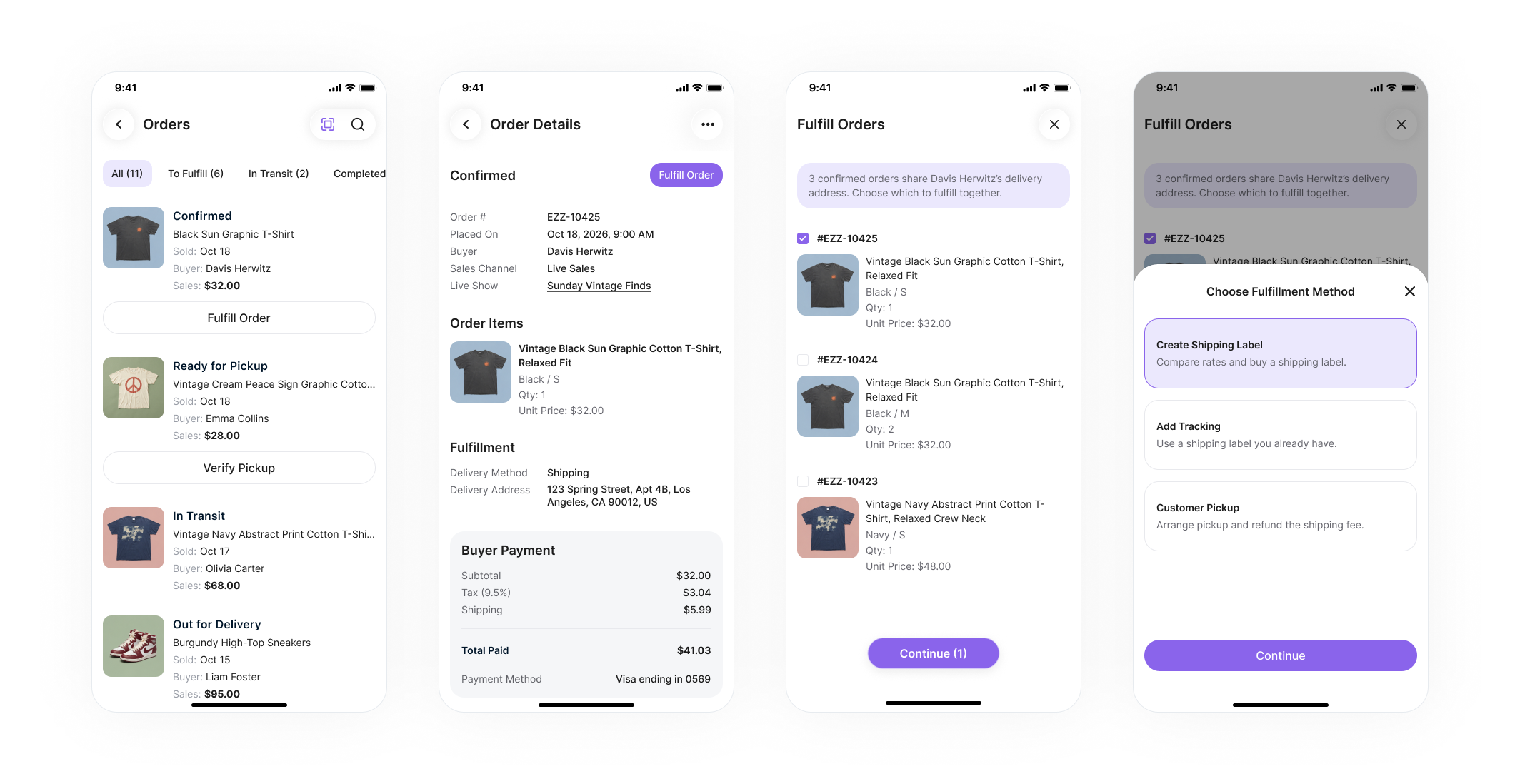
Related orders remain suggestions: sellers review the buyer, address, and selected items before continuing. They can purchase a label, add tracking, or arrange pickup. Label purchase and tracking produce Pre-Transit; preparation is distinct from delivery. Before label purchase, a final review keeps selected orders, destination, service, and total cost together at the point of commitment.

Fulfill Orders: review order details, select related orders and choose a fulfillment method

Confirm the physical handoff

I first designed manual code entry within the delivery constraint; QR scanning followed, and both are live. Scanning opens the matched order for buyer, product, and quantity review, with Enter Code Manually available as an alternative. Confirm Pickup records collection, moving Ready for Pickup to Delivered / Picked up. Recognition alone never completes the handoff.

/05. Outcomes & Reflection

A mobile workspace where the work happens.

Post-launch feedback describes sellers operating directly at pop-up and booth events, where phone-based workflows are convenient and quick. Buyers collect purchases in person without waiting for shipping.

The lesson was continuity: established business rules can support a new working context when task structure and interactions change with it. My 0–1 contribution connected those rules to complete mobile tasks and a verified physical handoff. This qualitative feedback supports the direction; task completion and recovery remain areas for further evaluation.

Back to Top